Discover → schedule → restore
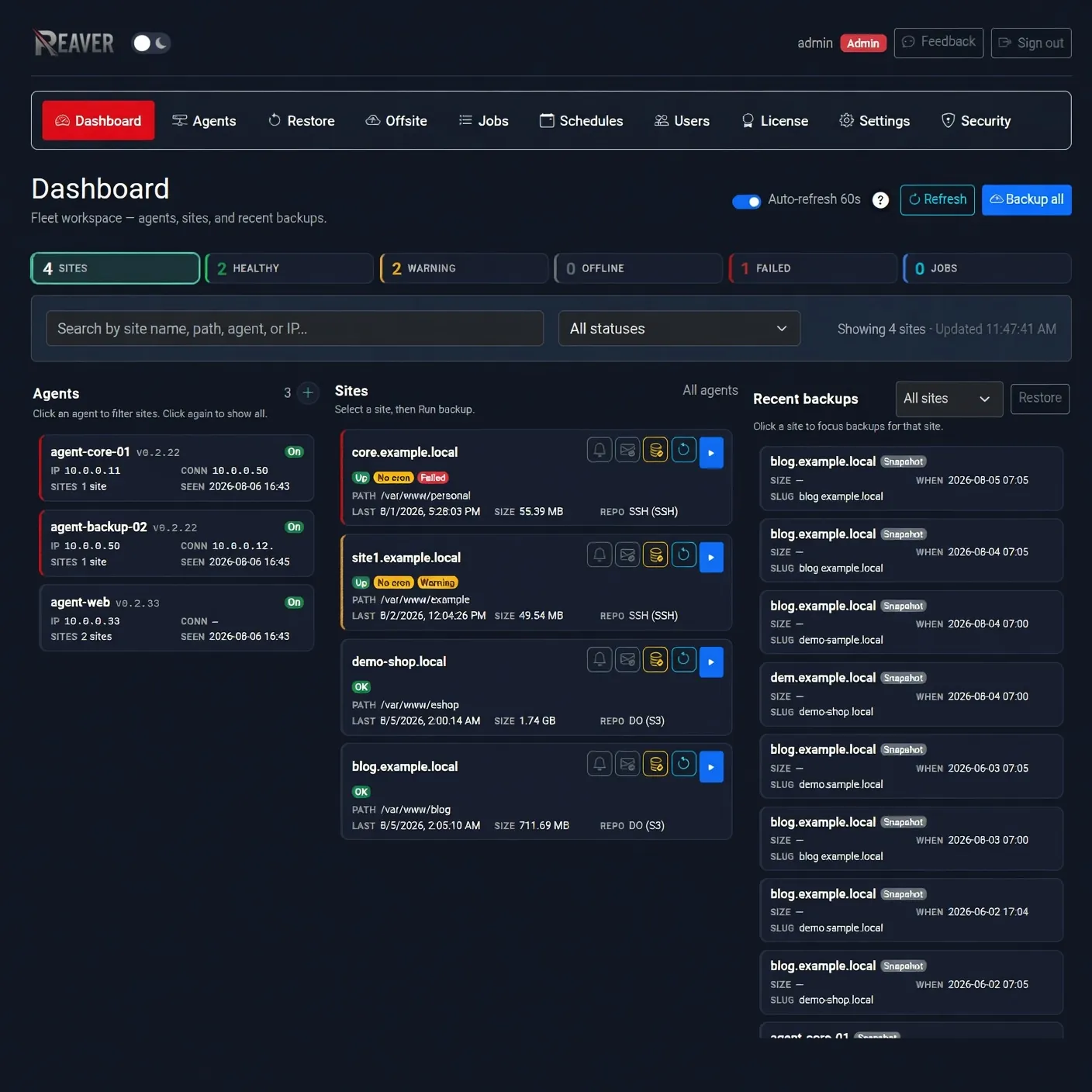
The everyday loop is simple: sites show up, you set a schedule, you restore from the same dashboard when something breaks. No hunting through server scripts.
Reaver Backup — easy site backups. Your servers. Your data.
One dashboard for WordPress and any directory — install once, auto-discover sites, schedule backups, restore when you need them. Self-hosted and privacy-friendly by design.
WordPress auto-discovery One-line install Self-hosted No SaaS vault
Free edition · no account required · guided first-run walkthrough · compare editions
Plugins are simple until you run many sites, pay per site, or worry who stores your files. Reaver Backup keeps the easy parts — discover, schedule, restore from a dashboard — while your servers and your storage stay yours.
Same idea as a plugin: connect storage, protect sites, restore when needed. You install once on your server, then finish everything in the dashboard UI.
One command. Create your admin in the browser — no WP plugin on every site.
Add a lightweight agent (SSH or one script). It reports back to the dashboard.
WordPress is auto-discovered. Point at any other folder when you need it.
Keep them on the server for a quick start, or send offsite to S3, B2, or SSH.
Run once, set a schedule, restore from the same dashboard when something breaks.
You do not have to memorize these steps. After you sign in, the same path appears as a first-run walkthrough and stays until you dismiss it or a backup succeeds.
Why people switch
You already know the job: protect the site, store the backup, restore when needed. Reaver Backup keeps that simple — and stops the per-site grind, plugin sprawl, and “someone else holds my files” feeling.
Schedule and restore from a clear UI. WordPress is handled automatically. Extra folders and multi-server fleets are available when you grow — without starting over on a new tool.
The everyday loop is simple: sites show up, you set a schedule, you restore from the same dashboard when something breaks. No hunting through server scripts.
Auto-discover WordPress installs, then protect apps, media, configs, or any folder on the same host. One product for sites and the rest of the server.
Backups land where you choose — local disk or S3, B2, SSH. Reaver Backup is not a multi-tenant vault for your site files. Privacy-friendly by design; optional minimal stats you can turn off.
True incremental snapshots mean you mostly store what changed — often 90%+ less space than full-only plugin dumps, so offsite bills and backup windows stay manageable.
Stop logging into every site to check backups. One dashboard covers multiple servers and site packs from free (1 site) through agency scale — without stacking per-site SaaS fees.
Email reports and a live status board show what is healthy and what needs attention — so “did last night’s backup run?” has a clear answer.
Point Claude, Cursor, LibreChat, Open WebUI, or LM Studio at your dashboard. The same list, backup, restore, and job checks as the UI — from the chat app you already use.
Security → MCP server on your dashboard. No extra package to install.
The URL is /api/v1/mcp on that host.
The app opens your Reaver Backup login. Approve a permission. It receives a scoped token — same limits as the REST API.
This runs on your dashboard, not a vendor MCP. Destination keys and restic passwords never go to the chat app.
All paid plans (not Free). Backup agents on your hosts stay poll-only workers — they are not the MCP server.
Solo 1 · Starter 5 · Pro 40 · Agency 100 · Scale 250 — predictable yearly pricing, offsite when you need it, and smaller incremental backups that keep storage costs down.
See pricing →One line + browser UI
Incremental · ~90% savings
Local · S3 · B2 · SSH
Restore from the dashboard
Client-side restic encryption is optional — off by default for simpler recovery, available when you need extra protection.
Wasabi, Backblaze B2, and most S3-compatible providers offer server-side encryption at rest by default — no configuration needed. Turn on client-side encryption only when you want an extra layer.
If you use your own server via SSH, you have full control over disk-level encryption (LUKS, ZFS, etc.). Optional restic encryption is available on top.
If you enable client-side encryption and lose the repository password, your data is gone forever. Enabling it requires a liability waiver — transparency over marketing checkboxes.
Your credentials are always encrypted at rest in the Reaver Backup database — recoverable, portable, and under your control. Client-side encryption of backup repositories is optional and configured in the dashboard when you need it.
Start free, grow with site packs, or compare Reaver Backup to the plugins you may already use.
As low as $0.20 per site / month at Scale. Solo is $24.99/year for one site with offsite. Full comparison →
$0 forever
One site, local storage, try risk-free.
$24.99/year
One site, one offsite, paid extras.
$99/year
Homelab-friendly — up to 5 sites.
$199/year
Growing fleets — 40 sites, unlimited offsite.
$349/year
Client fleets — up to 100 sites.
$599/year
Highest capacity — up to 250 sites.
If you already use a WordPress backup plugin, the question is not “does Reaver Backup have more checkboxes?” It’s will this feel as easy day to day — and fix the pain that made you look?
| What you care about | Reaver Backup | BackupBuddy | VaultPress | UpdraftPlus |
|---|---|---|---|---|
| Easy WP backups (files + DB) | Yes · auto-discover + dashboard | Yes · plugin | Yes · hosted vault | Yes · plugin |
| Install a plugin on every site? | No — one dashboard | Yes | Yes / service | Yes |
| Many sites from one UI | Built for fleets | Per-site | Per-site | Per-site |
| Where do backups live? | Storage you choose | Your destinations | Vendor vault | Your destinations |
| Cost as you add sites | Site packs (~$0.20–$1.65/site/mo) | Often per site | Per site / month | Free + premium tiers |
| Example: ~40 sites | Pro $199/year | Stacks per site | Stacks per site | Varies / premium |
| Incremental / storage savings | Yes · often 90%+ vs full-only | Often full-only | Limited | Limited / no true dedup |
| Restore experience | Dashboard restore UI | Plugin / migrate tools | Hosted restore | Plugin restore |
| Beyond WordPress (any path) | First-class | WP-focused | WP-focused | WP-focused |
| You run the control plane | Self-hosted | WP plugin | SaaS service | WP plugin |
| Offsite: S3, B2, SSH | Paid tiers | Limited set | Vault-centric | Yes |
| Power features (when you need them) | REST API & MCP (paid), audit log | — | — | — |
Install on any Linux server with a single command. Finish setup in the browser — a guided first-run walkthrough walks you through connecting a server, picking storage, and your first backup.
Restore onto a fresh server (watch).
SHA-256 verified • Official CDN only • Linux (Debian/Ubuntu installer)
Interactive by default (asks for public URL and install directory), or pass
--url and --dir.
After setup, a guided first-run walkthrough stays on the dashboard until your first backup succeeds.
Start free on one site. Grow with clear site packs when you need more. WordPress and any directory — on infrastructure you host.